





JMT M.2 M Key to OCulink-Compatible GPU Docking Station PCIe 4.0 X4 64GB/s for Mini PC Notebook Laptop to External Video Graphic Card (No M.2 Adapter)

 4.4 (97 items)
 Limited Time Sale
US$41.99 cheaper than the new price!!
Free cash-on-delivery fees for purchases over $99
Product details
| Management number | 216079772 | Release Date | 2026/04/19 | List Price | US$27.99 | Model Number | 216079772 | ||
|---|---|---|---|---|---|---|---|---|---|
| Category | |||||||||
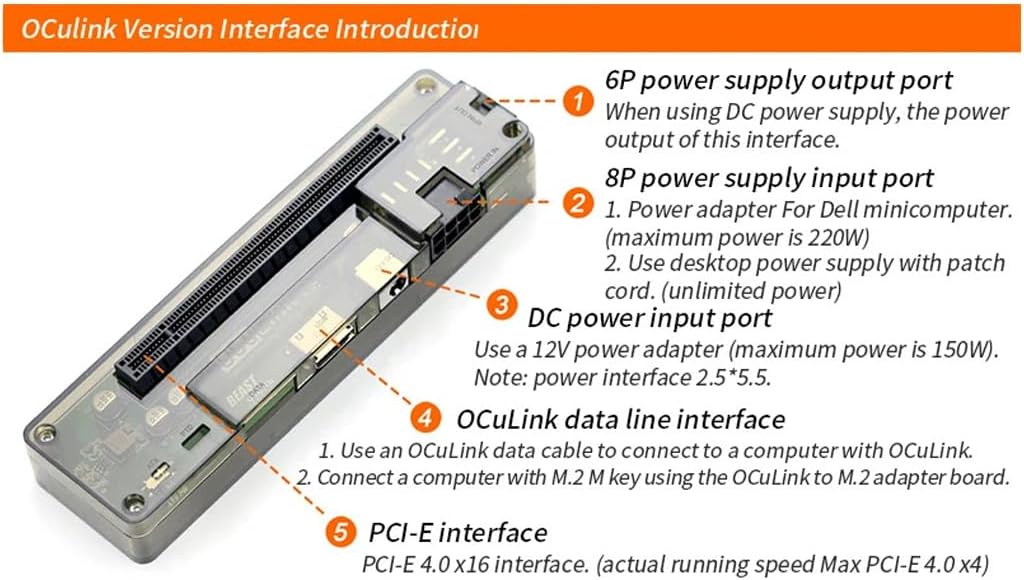
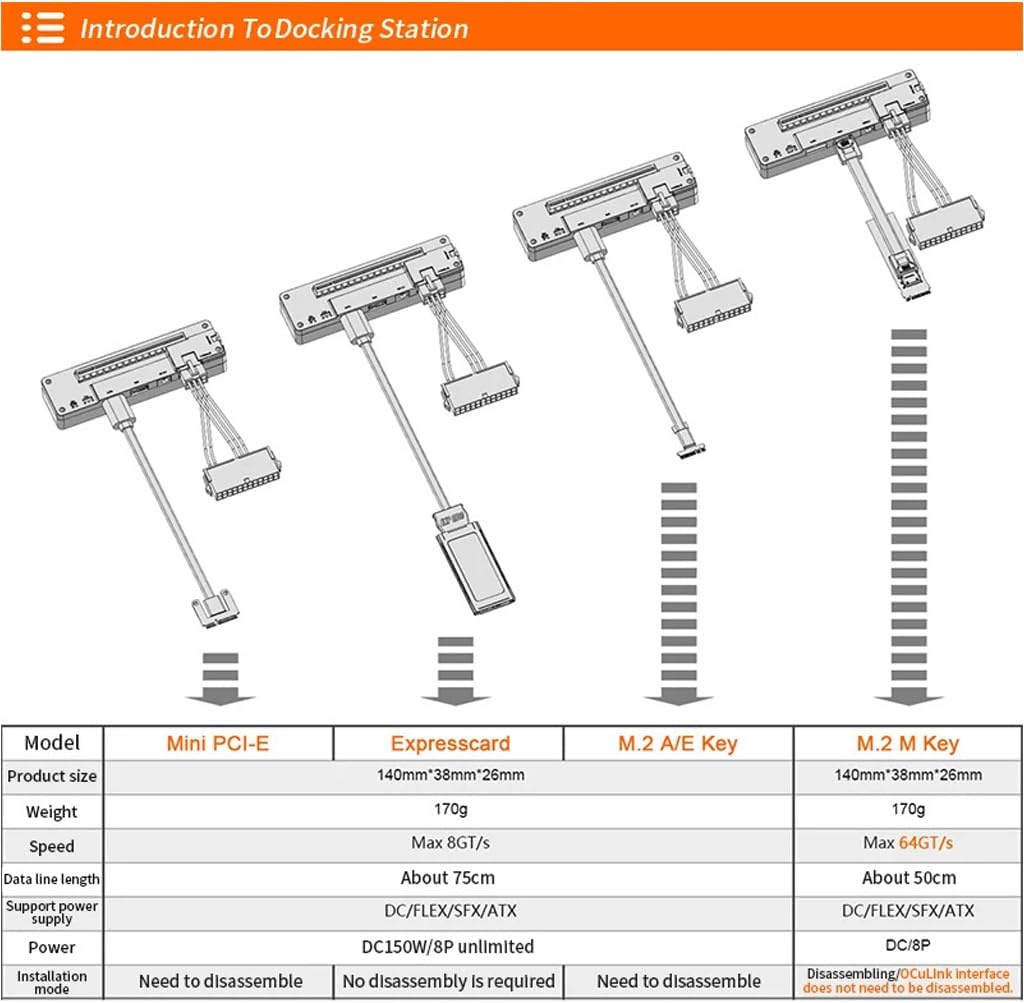
JMT M.2 M Key to OCulink-compatible GPU Docking Station PCIe 4.0 X4 64GB/s for Mini PC Notebook Laptop to External Video Graphic Card M.2 Adapter Card(with OCulink-compatible Port ) Optional Produduct Detail: OCulink-compatible version Board interface: 1.6P power supply output port When using DC power supply , the power output of this interface 2.8P power supply input port 1.Power adapter for Dell minicomputer( maximum power is 220W) 2.Use desktop power supply with patch cord ( unlimited power). 3.DC power input port Use a 12V power adapter ( maximum power is 150W) Note : power interface 2.5 * 5.5. 4.OCulink-compatible data line interface 1.Use an OCulink-compatible data cable to connect to a computer with OCulink-compatible interface. 2. Connect a computer with M.2 M key using the OCulink-compatible to M.2 adapter board. 5.PCI-E interface PCI-E 4.0 x16 interface. ( actual running speed Max PCI-E4.0 X4) M.2 M Key Docking Station parameter£º Product Size: 140*38*26mm Speed: PCIe 4.0 X4 64GB/s max. Data Line length: About 50cm. Supported Power Supplier: DC/FLEX/SFX/ATX Power: DC/8P Installation Mode: Disassembling/OCulink-compatible interface does not need to be disassembled.
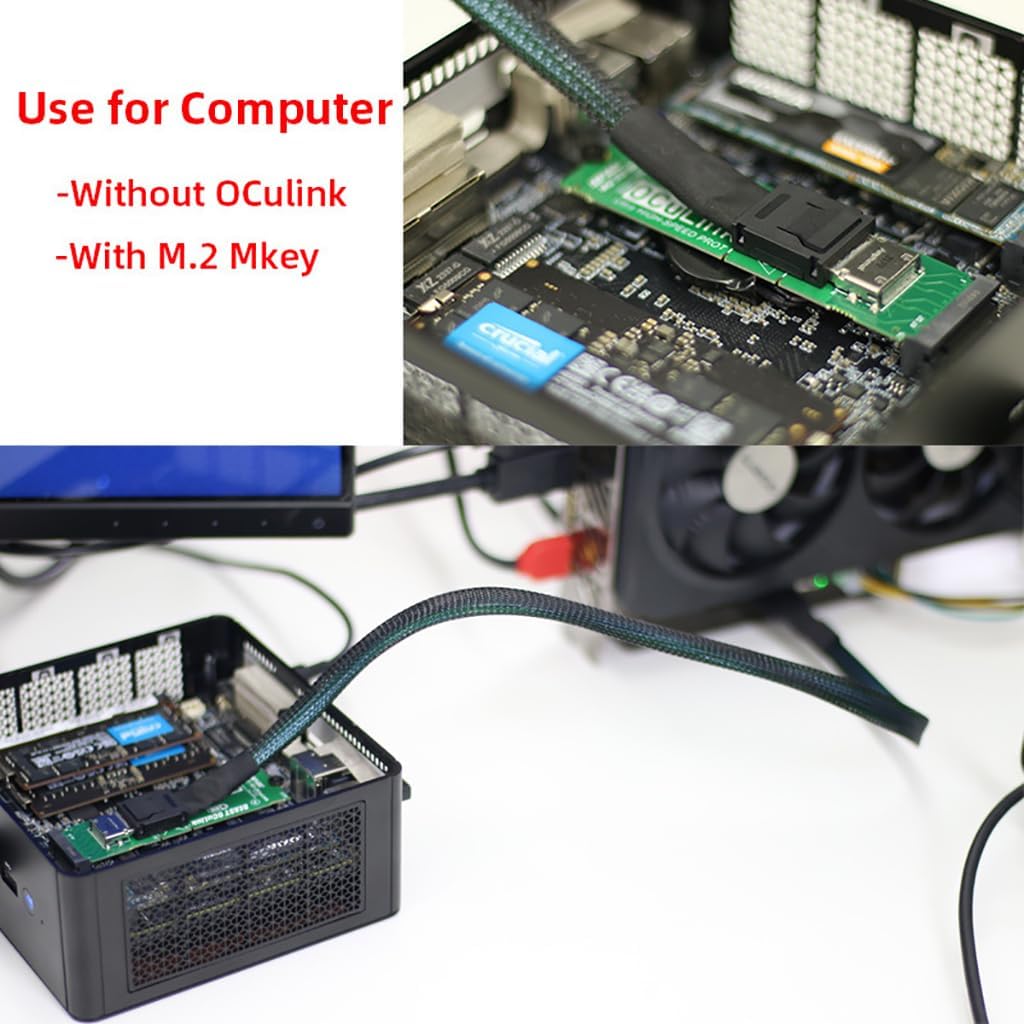
- OCulink-compatible Data Line Interface: Use an OCulink-compatible data cable to connect to a computer with OCulink-compatible interface. Connect a computer with M.2 M key using the OCulink-compatible to M.2 adapter board.
- PCI-E Interface: PCI-E 4.0 x16 interface. ( actual running speed Max PCI-E4.0 X4). 6P Power Supply Output Port: When using DC power supply , the power output of this interface.
- 8P Power Supply Output Port: Power adapter for Dell minicomputer( maximum power is 220W). Use desktop power supply with patch cord ( unlimited power).
- DC Power Input Port: Use a 12V power adapter ( maximum power is 150W), Power interface 2.5 * 5.5.
- High Speed: Support PCIe 4.0 X4 64GB/s max. Data Line length: About 50cm. Supported Power Supplier:?DC/FLEX/SFX/ATX. Power: DC/8P [M.2?Adapter Card(with OCulink-compatible Port?) Optional].
| Manufacturer | JMT |
|---|
Bestseller ranking
Docking Stations


![UANTIN USB C to HDMI 2.1 Adapter with 100W USBC Charging Port, Supports [8K, 4K@120Hz/60Hz HDR], 48Gbps Thunderbolt to HDMI Adapter Compatible for Laptop, iPhone 15/16, Switch 1/2, Steam Deck](https://m.media-amazon.com/images/I/61CzPNomBIL._AC_SL1500_.jpg)
Customers who viewed this product also viewed
Sample Vials





Correction of product information
If you notice any omissions or errors in the product information on this page, please use the correction request form below.
Correction Request Form